Table of Contents
Sakan Qatar is one of the leading digital platforms specializing in offering integrated services for property search and management, whether for buying, renting, or marketing real estate. The platform serves as a prime example of digital transformation in the real estate sector, providing users with easy and direct access to a wide range of property options. In this guide, we’ll walk you through the steps for using the platform in detail to help you make the most of its advanced features.
How to Register on the Sakan Qatar Platform?
Visit the Platform:
-
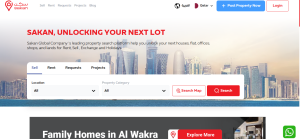
Open the Sakan Qatar website.
-
Click on the “Register” button at the top right corner of the homepage.
Enter Basic Information:
-
Fill in the required fields such as your email address or phone number.
-
Create a strong and secure password.
-
Confirm the password.
-
Agree to the Terms of Use and Privacy Policy.
Account Verification:
-
You will receive a verification code via email or SMS.
-
Enter the code in the designated field to activate your account.
Note: Make sure you use an active email address and phone number to avoid future issues with account recovery.
How Can I Search for a Property That Suits My Needs?
Advanced Search Bar:
-
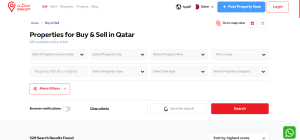
Enter the desired location (city or area like Doha or Al Wakra).
-
Select the type of property (apartment, villa, office, shop).
Apply Filters: Use the advanced options to customize your search results based on:
-
Number of rooms.
-
Price range.
-
Total area.
-
Available facilities (parking spaces, elevators, swimming pools).
Review Properties:
-
Browse through the available listings.
-
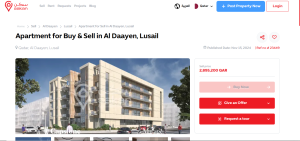
Click on any property to view full details such as photos and specifications.
Contact the Advertiser:
-
Use the direct messaging feature or the provided contact information to get in touch with the advertiser.
How to Request a Property Viewing?
Select the Property:
-
From the property’s page, click the “Request Viewing” button.
Fill Out the Request Form:
-
Enter the details of your preferred appointment time.
Submit the Request:
-
The advertiser will be notified and will contact you to confirm the appointment or suggest another time.
Tip: Choose times that fit well into your daily schedule and prepare a list of questions about the property for a smoother experience.
How Can I List a Property for Sale or Rent?
Login to Your Account:
-
Sign in using your email or phone number.
Access Your Dashboard:
-
From the main menu, select “Add Property.”
Enter Property Details:
-
Choose whether it’s for sale or rent.
-
Fill in basic information:
-
Detailed location.
-
Number of rooms and total area.
-
Price.
-
A brief description highlighting key features.
-
Upload Photos:
-
Add high-quality images that clearly showcase the property.
Review and Publish:
-
After verifying all details, click “Publish.”
Note: Ensure all information is accurate and updated to attract the right audience.
What Are the Available Payment Options for Buying or Renting a Property?
-
Bank Transfer: Ideal for high-value transactions.
-
Electronic Payment: Credit or debit cards can be used for certain services.
-
Cash Payment: Often available for direct rental deals.
Tip: Always confirm with the advertiser which payment options are accepted.
How Can I Edit or Delete a Property I Listed?
Access Published Listings:
-
From your dashboard, select “My Listings.”
Update Details:
-
Click the “Edit” button to update photos or information.
-
To delete a listing, choose “Delete.”
How Can I Contact the Property Owner or Agent?
-
Direct Messages: Use the direct messaging feature on the platform.
-
Contact Information: The advertiser’s phone number and email address will be available on the property details page.
How Can I Benefit from Sakan’s Property Packages?
Choose the Right Package:
-
Select a package based on the number of properties you want to list.
Subscribe to a Package:
-
Confirm your payment and start adding your properties.
Note: Advanced packages provide additional marketing tools and performance analysis features.
How to Save a Property to Your Favorites List?
Sign In to Your Account:
-
Make sure you’re logged into your account.
Add to Favorites:
-
While browsing, click on the “Save Search” option next to any property you like.
How Can I Track the Status of My Requests?
Login to Your Account:
-
Sign in to the platform.
Review Requests:
-
Go to the “My Requests” section to track the status of all your submissions.
What Is the Cancellation and Refund Policy?
Canceling Deals:
-
You must contact the advertiser or real estate agent directly to cancel a deal.
Refunds:
-
If there was an advance payment, you can negotiate the refund according to the platform’s policies.
How Can I Update My Personal Account Information?
Access Account Settings:
-
Log in to your account and go to “Account Settings.”
Update Information:
-
Modify details such as your phone number, email address, or password.
Can I Share Properties with My Friends?
-
Email Sharing: Use the “Share via Email” option to send property details to others.
-
Social Media Sharing: You can share listings on platforms like Facebook, Twitter, and Instagram.
How Can I Report a Technical Issue or Request Assistance?
-
Email Support: Send a message to the platform’s technical support email.
-
Live Chat: In some cases, you can chat directly with support through the live chat feature on the platform.
What Is a Property Advertisement License? How Can I Get One?
Definition: A property advertisement license is a permit allowing advertisers to list their properties on real estate platforms. To obtain this license, you must submit certain documents proving property ownership or that you are a certified real estate agent.
Steps:
-
Register on the Platform: Make sure you are signed up with Sakan.
-
Submit Required Documents: Provide proof of ownership or authorization from the owner.
-
Obtain the License: After document verification, the platform will issue you a property advertisement license.
Sakan Qatar offers a comprehensive digital experience to meet your real estate needs quickly and efficiently. Thanks to its advanced tools, user-friendly interface, and flexible payment options, you can save time and effort while searching for or marketing your properties. Take advantage of the opportunity and start exploring everything Sakan has to offer to achieve your real estate goals effectively.