Table of Contents
Sakan Qatar is an integrated digital gateway designed to simplify real estate operations, whether you’re looking to rent or buy a property, or list one for sale or lease. The platform delivers a premium experience tailored to different types of users, including property seekers, real estate agents, developers, and real estate companies. In this article, we’ll walk you through the detailed steps to register an account on Sakan Qatar, while also noting some differences compared to platforms in Kuwait.
Why Choose Sakan Qatar?
Sakan Qatar offers unique advantages that make it an ideal choice for conducting real estate transactions, including:
-
User-Friendly Interface: The platform features a simple and practical design that makes it easy to navigate.
-
Wide Range of Listings: It hosts a diverse selection of residential and commercial properties.
-
Advanced Tools: It provides powerful search filters, advanced search options, and easy ad management.
-
Instant Communication: Users can contact agents or advertisers directly through the platform.
How Can You Access the Sakan Qatar Platform?
There are two ways you can access Sakan:
-
Website:
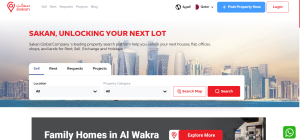
Open your internet browser and search for “Sakan Qatar,” or visit the official website directly at: https://qa.sakan.co/ar/ -
Mobile App:
Download the “Sakan” app from your device’s app store (either App Store for iOS or Google Play for Android).
How to Register a New Account on Sakan Qatar?
Step 1: Access the Platform
Once you reach the website or open the app, click on the “Create Account” button at the top of the page.
Step 2: Choose the Account Type
Sakan offers several account types based on your needs:
-
Property Seeker: If you are looking to buy or rent a property.
-
Property Owner: If you want to list your property for sale or rent.
-
Real Estate Company or Developer: If you run a real estate business or develop properties.
-
Real Estate Agent: If you act as an intermediary between buyers and sellers.
Step 3: Enter Your Personal Information
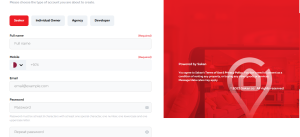
For Property Seekers:
-
Full name
-
Phone number
-
Email address
-
A strong password (with confirmation)
-
Agree to the terms and conditions
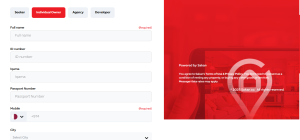
For Property Owners and Developers:
-
Company name
-
Commercial registration number
-
Name of the responsible manager
-
Official phone number and email address
Step 4: Verify Your Account
You will receive a message containing a verification code via email or phone.
Enter the code in the designated field to activate your account.
Step 5: Start Using Your Account
After activation, you can log in and start enjoying all available features like browsing properties, posting ads, and managing your requests.
How to Benefit from Sakan’s Real Estate Promotion Packages?
Sakan offers special promotion packages such as paid ads.
You can subscribe to a suitable package to increase the visibility of your property listings.
What Are the Benefits of Registering an Account on Sakan Qatar?
-
Advanced Search: Access a wide range of property options using smart filters and tools.
-
Easy Listing: Post your property with photos and descriptions within minutes.
-
Favorites Management: Save properties you like to review later.
-
Customer Support: A dedicated technical support team is available to help with any issues.
-
Enhanced Credibility: Verified accounts ensure a safer environment for all users.
Registering an account on Sakan Qatar is your first step towards experiencing a fully digital real estate journey. Whether you’re hunting for your dream home in Qatar — be it in Doha, Al Wakrah, Lusail, or beyond — or looking to market a property, Sakan provides all the tools you need in a simple and efficient way.
Follow the steps above to start your journey with Sakan and enjoy a real estate experience that truly meets all your expectations.